Trainer management

Every Trainer,
Qualified
and Ready.

Trainer availability and qualifications live in someone's head, or a spreadsheet. Here, the system only offers trainers who are free and qualified, and gives each one a phone app for the day itself.

Trainers

Qualified Only

Attendance

Taken on a Phone

Double-Bookings

Caught Early

Trainer App

Today for Marko

Live

Working at Heights, GWO

09:00 · Room 2 · 18 participants

Qualified

Attendance

Digital sign-in on the phone

16 / 18

Certificates

Ready to issue once attendance is in

Waiting

Courses

2

Qualified

Yes

Present

16/18

What trainer management does for you

The right trainer on every course, and attendance back without chasing.

assignment_ind

Assign trainers, rooms, and equipment

Plan everything a course needs from one place, with no separate spreadsheet.

One plan for every course

verified_user

Checks the trainer is qualified

The system only offers trainers who hold the qualifications that course needs.

Nobody teaches what they can't

event_busy

Catches double-bookings before they happen

A trainer or room cannot be booked twice. Clashes are flagged before you publish.

No Tuesday-morning surprises

smartphone

A trainer app for the day

Trainers see their schedule, course materials, and participant lists on a phone.

Everything the trainer needs, in hand

how_to_reg

Take attendance on a phone

Digital sign-in marks each participant present, so attendance comes back without chasing.

No paper sheet to type up later

workspace_premium

Certificates issue after attendance

Once attendance is marked, certificates for the participants who attended are ready to issue.

Attendance and certificates stay together

Operations view

See trainer and venue readiness before the course goes live

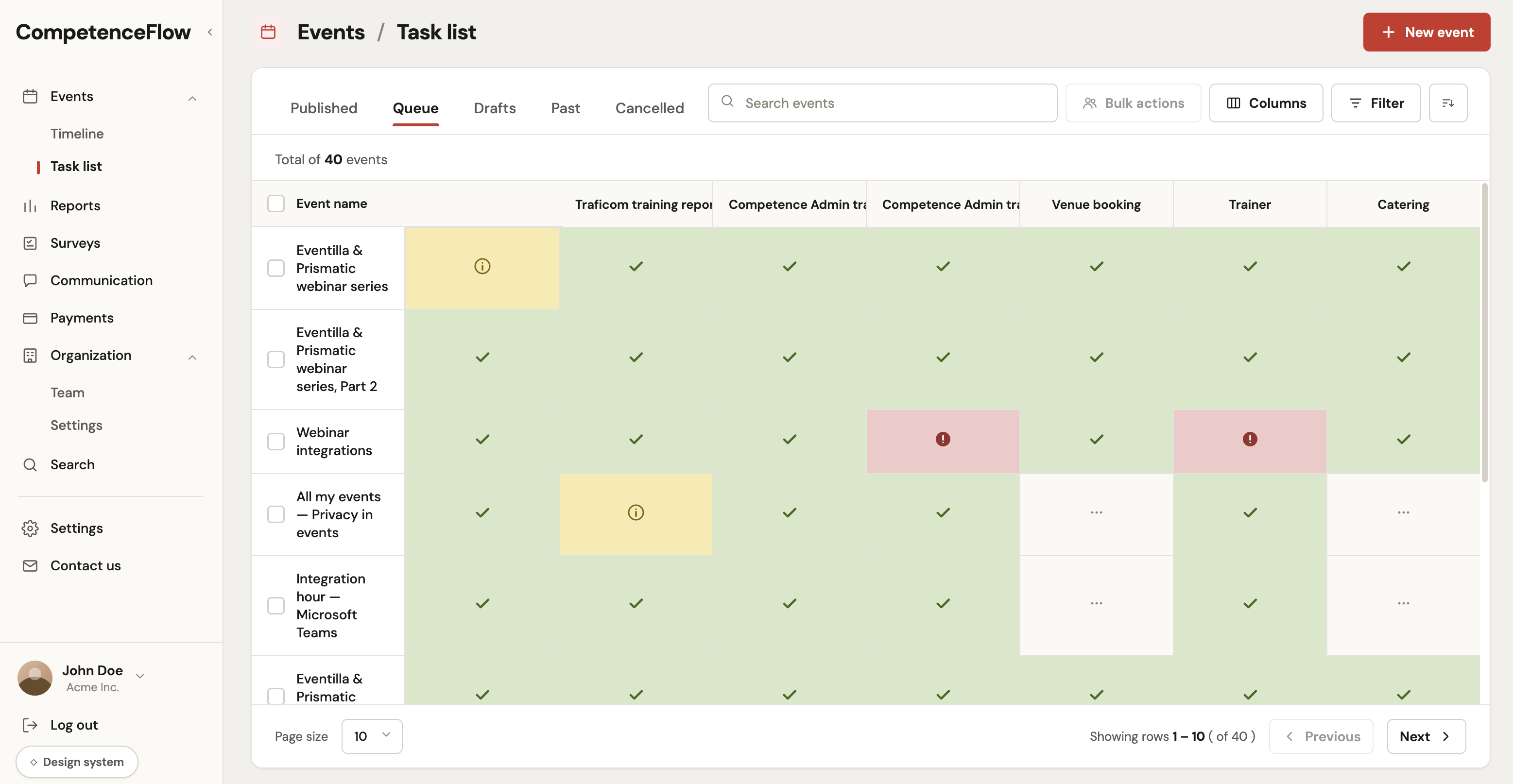
The task list gives coordinators one place to see which events are ready, which are waiting for a trainer, and where venue or catering work still needs action.

  • checklist Track trainer, venue, catering, and report status across queued events.
  • warning Spot missing work before a course reaches the delivery team.
Event task list
CompetenceFlow task list showing queued events, trainer readiness, venue booking, catering, and warning states

From assignment to attendance

Five steps from a course that needs staffing to attendance and certificates.

event_note

Step 01

Course Needs a Trainer

A scheduled course needs staffing and a room.

person_search

Step 02

Qualified Trainers Offered

The system shows only trainers free and qualified.

assignment_turned_in

Step 03

Trainer Assigned

The course appears in the trainer's app with materials.

co_present

Step 04

Day of Delivery

The trainer takes attendance on a phone.

verified

Step 05

Attendance In

Certificates are ready to issue and billing is updated.

The result: the right trainer on every course, and attendance back the moment the course ends.

Trainer management FAQ

Common questions about assigning trainers, qualification checks, and the trainer app.

Trainer management

The right trainer
on every course.

Walk through assigning a qualified trainer, the trainer app, and attendance taken on a phone.