Course management

Course
Management,
One Calendar.

One coordinator, eight spreadsheets, and a trainer double-booked on Tuesday. Plan trainers, venues, and equipment from one screen instead, with double-bookings caught before you publish, so you can run more sessions without the scramble.

Double-Bookings

Caught Early

Trainers

Qualified Only

Time Zones

Handled For You

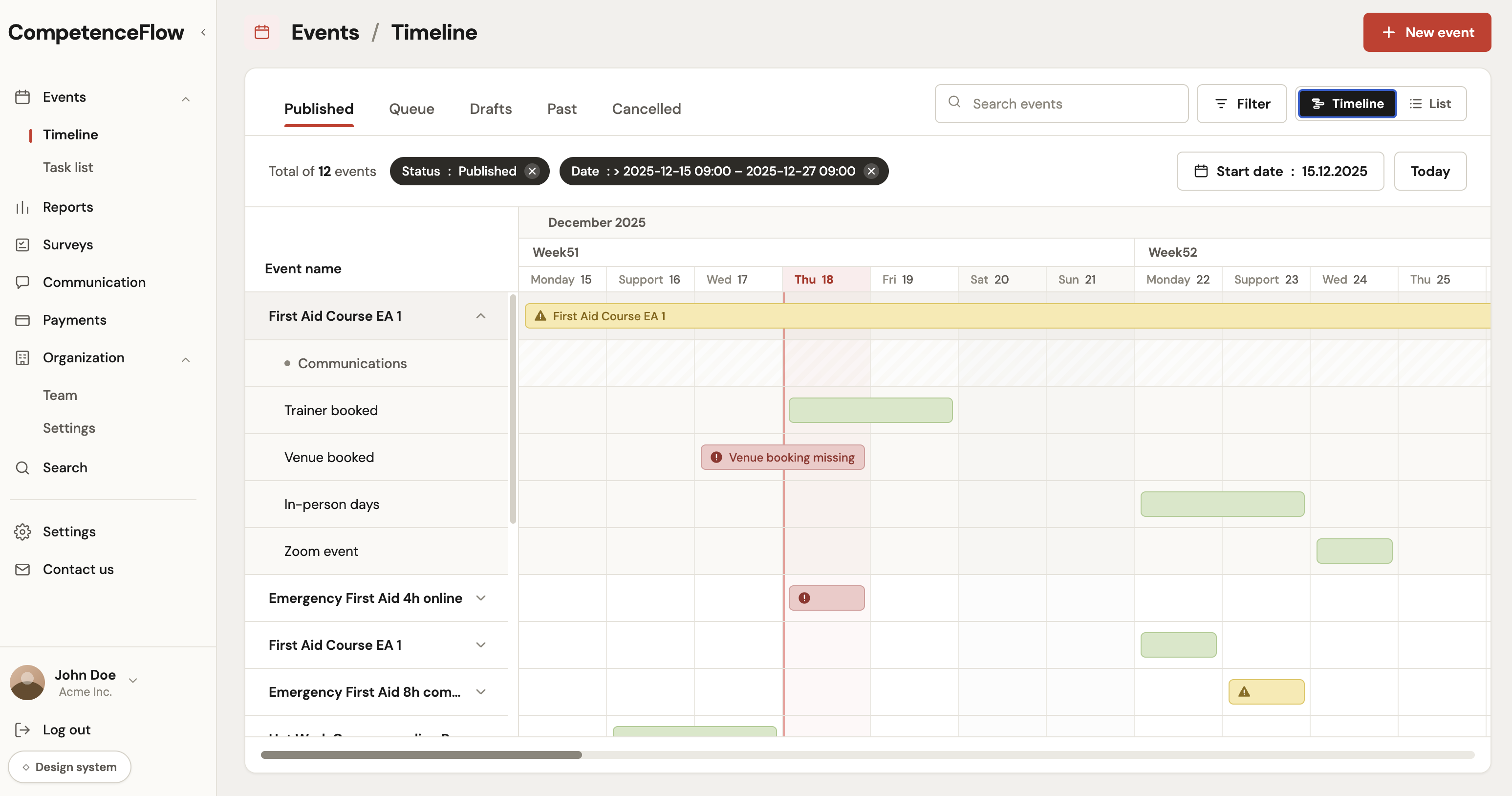
Live course timeline
CompetenceFlow event timeline showing course planning tasks, trainer bookings, venue booking warnings, and scheduled in-person days

What course management does for you

Plan, fill, and deliver every course from one place.

school

Every course type, one screen

Live, online, and self-study courses all plan from the same view.

No separate tools per format

calendar_view_month

Clear session status

A session moves through Draft, Published, Active, Past, and Cancelled, and only the right people can change it.

Nothing goes live before it's ready

bolt

Update many courses at once

Change status, edit fields, and assign trainers across a batch of courses in one go.

No editing sessions one by one

content_copy

Set up a run of courses from a template

Reuse course, description, and venue templates. Override locally, reset when needed.

Same setup across every location

meeting_room

See which rooms are free

Track capacity, rooms, and clashes per venue and session.

Catches overbooking before it happens

event_repeat

Calendar and time zones, sorted

Time zones handled for you, with sync to Google Calendar, Outlook, and iCal.

No one shows up an hour late

From template to confirmed course

Five steps from template to confirmed delivery.

content_copy

Step 01

Create From Template

Start from a reusable template.

schedule

Step 02

Set Date and Timezone

Set start/end, timezone, and language.

person_search

Step 03

Assign a Trainer

The system only offers trainers free and qualified to teach it.

publish

Step 04

Publish and Sync

Push to calendars and notify participants.

groups

Step 05

Handle Capacity

Enforce ticket limits, waitlists, and queue promotion.

Result: sessions go from template to published in minutes, not hours.

A CompetenceFlow team member working on a laptop in the Oulu office in Finland

How teams manage courses day to day

Recurring setup, schedule changes, trainer assignment, and multi-location coordination.

calendar_today

Plan the week

1

Plan all session types in one view.

2

Set date, time, and timezone once.

3

Filter, search, and sort by status.

content_copy

Template-Driven Setup

1

Launch sessions from reusable templates.

2

Keep content consistent across locations.

3

Override locally, reset to standard when needed.

meeting_room

Venue and Capacity Logistics

1

See rooms, capacity, and logistics before publish.

2

Propagate venue updates across related sessions.

3

Spot and resolve conflicts before delivery.

person_search

Assign trainers and sync calendars

1

Only see trainers free and qualified to teach the course.

2

Double-bookings blocked before they happen.

3

Sync via Google Calendar, Outlook, and iCal.

A real look at the course timeline

The timeline shows the course, the supporting work, and the gaps that still need attention before delivery.

Published events
CompetenceFlow course timeline with published events, date filters, trainer booking, venue booking warnings, and delivery milestones
Product screenshot from CompetenceFlow event timeline.

Course management FAQ

Common questions about setting up and running courses.

Course management

Plan every course from
one place.

Walk through course setup with your own courses, trainers, and venues.